So your invoice does not come back
Drop your ZUGFeRD, Factur-X or XRechnung file. In about two seconds you see whether it passes, and for every error the line, the excerpt and what to change. No sign-up, no install.
Free and without an account. With an account you check 20 invoices a week.
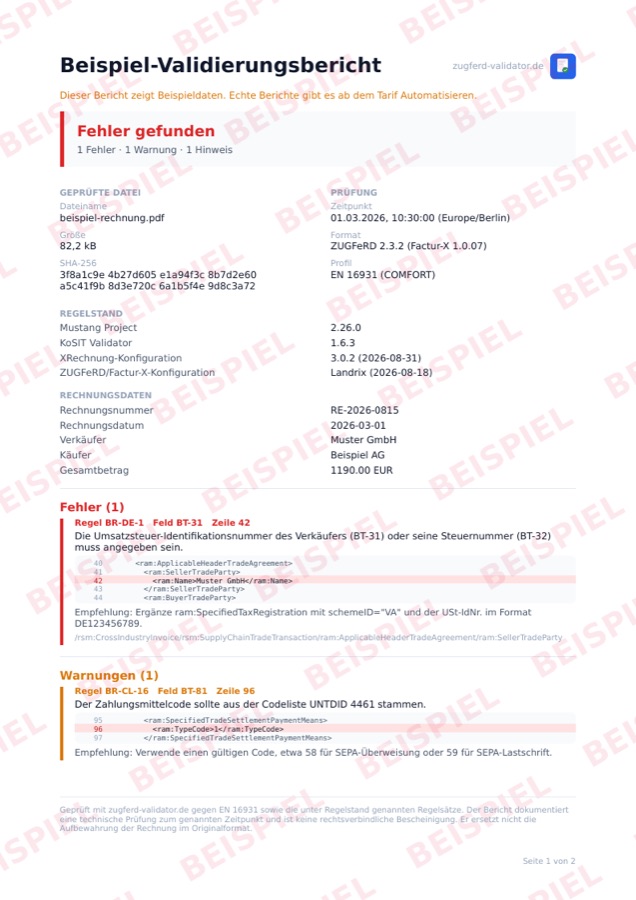
This is what every result looks like. Check your own invoice →
Not just what is wrong, but where
Other validators name the rule and leave you to find the spot. We give you the line number, show the excerpt from your file and say what belongs there.
Line and excerpt
Every message carries the line number and the affected spot from the original, highlighted. Schema errors included, and XML embedded in a ZUGFeRD PDF too.
A fix, not a rule number
160 rules come with plain text naming the field, the path and an example. “BR-DE-1” helps nobody, “the seller's VAT number is missing” does.
Two engines, not one
Every file runs through Mustang and through the KoSIT validator of the German federal government. Whatever either one flags shows up in the result.
Rule set
| Engines | Mustang 2.26.0 · KoSIT 1.6.3 |
|---|---|
| Standard | EN 16931 |
| XRechnung | 3.0.2 (2026-08-31) |
| ZUGFeRD / Factur-X | up to 2.5.2 / 1.09.2 |
| Response time, median | 1,8 s |
| Response time, 95 % | 2,5 s |
| Stored invoices | none |
| Server location | Nuremberg, Germany |
The result as a report you can file
Anyone who checks an invoice often has to show that they checked it. The report records what was checked, when and with which rule set, ready for the archive or the finance department.
Checksum, timestamp, rule set
SHA-256 of the checked file, the time with time zone and the versions of both engines. That is what ties a report to a file later on.
The checked invoice attached
On request the original file is appended as further pages and embedded to PDF/A-3. One document instead of two.
German, English, French
For groups with recipients abroad. From the Automate plan; a sample is available without an account.
After the check it goes on
Two steps that otherwise cost manual work: fixing the error and getting the next invoice right from the start.
Fix errors automatically
Upload the faulty invoice. Whatever can be derived safely we correct ourselves. Only where we would have to guess do we ask, for example about the routing id. You get a valid file back. In the Automate plan.
Repair an invoice →Create invoices
Turn structured data into a valid ZUGFeRD PDF or XRechnung, with several line items, all VAT categories and the routing id for public authorities. In the browser or through the API.
Create an invoice →For developers
One call, structured JSON back
The same check as in the browser, as a REST endpoint. The answer carries rule, field, line, excerpt and the fix, everything your code needs to carry on.
validate_invoiceChecks PDF and XML against EN 16931, XRechnung and Factur-X.
extract_xmlPulls the embedded XML out of a ZUGFeRD PDF.
check_consistencyCompares the visible PDF data with the XML. Finds tampered amounts.
create_invoiceTurns data into a valid invoice, stateless, per call.
validation_reportReturns the report as PDF/A-3, on request with the checked file.
All five are available as an MCP server too, so an AI agent can call them directly: npx zugferd-mcp-client.
Clear. No surprises.
Start free. Move up when you need more.
free forever
Check invoices one by one – in the browser or by API.
Start for free- 20 validations / week
- 1 login
- 1 invoice / month created
- All 4 MCP tools
- 160 rule fixes
- Structured JSON
- – One invoice at a time
- – “Created with zugferd-validator.de” footer on generated invoices
- – No support, no SLA
billed yearly · 228 €/year
For teams that check invoices inside a workflow.
- Batch check: several invoices at once
- Repair: fix errors automatically
- 500 validations / week
- Company account with 3 logins: one quota, one invoice, one contract
- Invoices created: unlimited
- White-label invoices (your logo)
- Everything in Free
- E-mail support (48 h)
- 99 % uptime SLA · priority updates
billed yearly · 828 €/year
For high volume and business-critical processes.
- Unlimited validations
- Company account with 10 logins: one quota, one invoice, one contract
- Extra logins for 49 € per user and year
- Unlimited invoice creation
- Batch check (bigger batches)
- Everything in Automate
- Dedicated support
- Fair use: 300 calls / hour
All prices exclude VAT. · See the full API documentation →
More than 300 calls an hour, or bulk processing? Enterprise plan on request →
You set up logins for colleagues yourself: open a company account under Team in your account and invite them. Everyone signs in with their own address, you share the quota, there is one invoice for the company and one data processing agreement. The account also shows who validated how much.
¹ Fair use: Automate is built for 60 API calls an hour, Scale for 300 — enough for normal business. For higher throughput, bulk processing or a fixed SLA, see the Enterprise plan.
| Feature | Free | Automate | Scale |
|---|---|---|---|
| Validations / week | 20 | 500 | Unlimited¹ |
| Invoices created / week | 1 | 20 | Unlimited¹ |
| Max. API calls / hour | – | 60 | 300 |
| User logins | 1 | 3 | 10 |
| Company account: roles, rights and per-person limits | |||
| Extra logins available | 49 €/year | ||
| The account shows who validated how much | |||
| Batch check (several invoices at once) | |||
| Repair invoice (automatic fixes) | |||
| validate_invoice | |||
| extract_xml | |||
| check_consistency | |||
| create_invoice | |||
| White label (no footer) | |||
| 160 fix suggestions | |||
| E-mail support | |||
| Dedicated support | |||
| SLA | 99 % | 99 % |
E-invoicing, EN 16931 & validation — the short version
Answers on formats, syntaxes and validation.
What is EN 16931?
Which formats does the validator support?
Does the validator check Peppol BIS rules?
PEPPOL-EN16931-R040, with the same fix suggestions as every other rule. To be precise about what this is not: we are not a certified Peppol validator and not a Peppol Access Point. We check invoice content, we do not send invoices over the Peppol network.What is the difference between CII and UBL?
How do I validate an e-invoice?
/v1/validate with your API key in the X-Api-Key header. You get structured JSON back: detected format and profile, a list of errors and warnings with rule ID, the affected BT field, a concrete fix suggestion and an XPath, plus the invoice metadata. Validation runs against EN 16931 with Mustang Project and the KoSIT validator. Details in the API documentation.What does a BR error mean?
Can I create invoices with it too?
POST /v1/create or the MCP tool create_invoice you turn structured JSON into a valid e-invoice — either a ZUGFeRD or Factur-X PDF (PDF/A-3 with embedded XML) or plain XRechnung XML with a routing ID for public-sector buyers. Several line items, all VAT categories (standard, exempt, reverse charge), discounts and charges and payment details are supported, and so are credit notes, corrections and prepayment invoices that reference the original. The API is stateless: each call returns the finished invoice, nothing is stored. You can validate on creation or afterwards with validate_invoice.Is there a sandbox for invoice creation?
zv_test_…, shown in your account) next to the live key. Use it to test your integration without spending your live quota. Invoices created in sandbox mode carry a clear tiled “DEMO” watermark on every page and a note in the XML — fully testable, but not valid for real business. Use the live key for real invoices. Validation itself you can try for free on the Free plan or with the public demo key.What does it cost? Is there a free plan?
How do several colleagues work on one account?
Can I plug the API into Claude or other AI agents?
zugferd-mcp-client) that installs through npm and plugs into MCP-capable AI tools such as Claude. It exposes the tools validate_invoice, extract_xml, check_consistency and create_invoice, so an agent can check, read and create e-invoices on its own.Where is my invoice data processed?
Check the invoice before the recipient does
Drop the file, read the result. Free, without an account, in about two seconds.